CLI overview
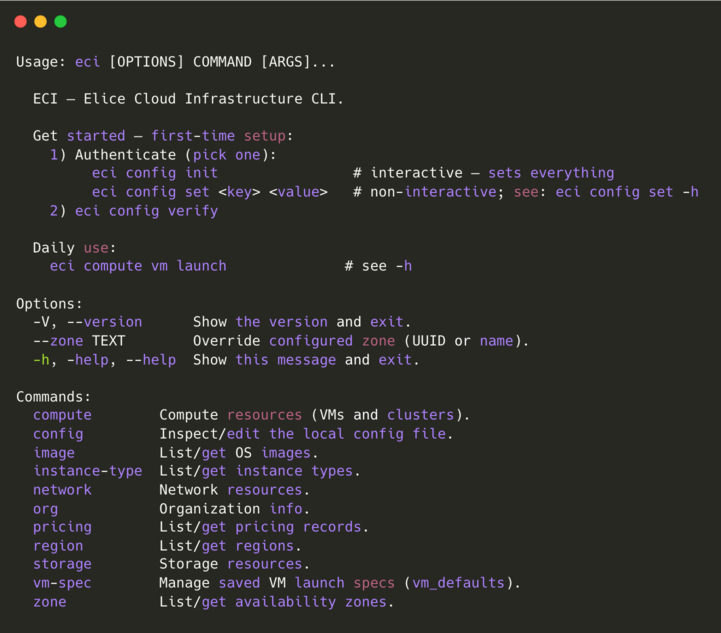
The ECI CLI is the command-line interface for Elice Cloud Infrastructure. It lets you manage VMs, networks, and storage from a terminal and integrate them into automation scripts and CI/CD.
Install
For release notes and bug reports, see github.com/elice-dev/eci-cli.
- macOS / Linux
- Windows (PowerShell)
curl -fsSL https://raw.githubusercontent.com/elice-dev/eci-cli/main/scripts/install.sh | sh
powershell -c "irm https://raw.githubusercontent.com/elice-dev/eci-cli/main/scripts/install.ps1 | iex"
Once it's installed, run eci --version to print the version and confirm.
eci --version
Supported platforms:
- macOS (arm64, Apple Silicon)
- Linux (x86_64)
- Windows (x86_64)
Configure
You can configure the CLI in two ways depending on your environment.
| Method | Command | Notes |
|---|---|---|
| Interactive | eci config init | Prompts for endpoint, token, and zone in one go |
| Non-interactive | eci config set <key> <value> | Set each value individually. Good for scripts and AI agents |
AI agents like Claude Code sometimes have trouble with interactive prompts, so eci config set works more reliably.
Interactive (eci config init)
eci config init
| Field | Value |
|---|---|
| Endpoint | Commercial: https://portal.elice.cloud/apiPublic sector: https://portal.gov.elice.cloud/api |
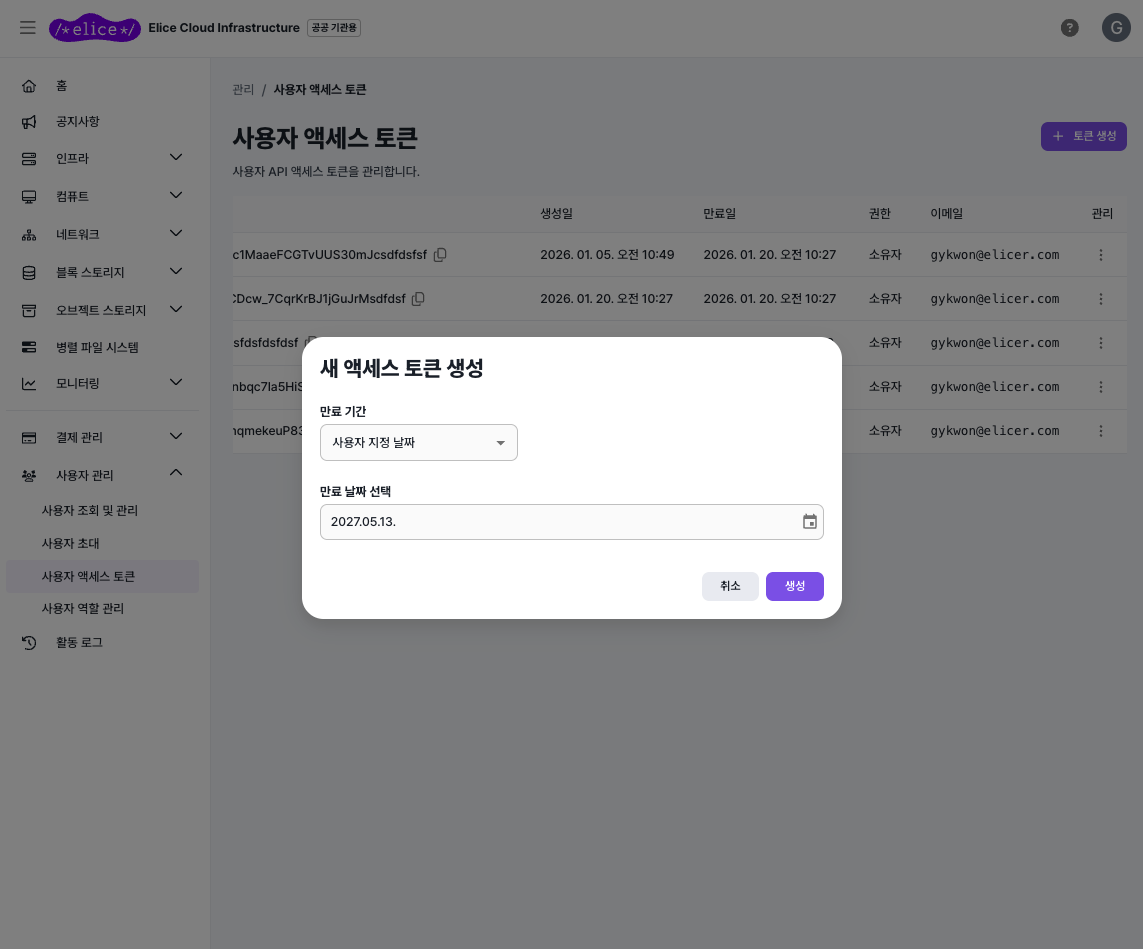
| Token | Sign in to the portal → User Management → User Access Tokens → create a token → paste the issued value |
| Zone | Auto-selected if there's only one; otherwise you pick from a list |
Non-interactive (eci config set)
eci config set api_endpoint https://portal.elice.cloud/api
eci config set api_token <TOKEN>
eci config set zone_id auto       # auto-select zone
Config is saved to ~/.eci/config.yaml (mode 0600).
Verify
eci config verify # auth + zone validation
Hints and setup commands are printed for each failing item — follow the guidance.
Resource query pattern
Every resource uses the same shape.
eci <group> <resource> list              # list
eci <group> <resource> get <name|id>     # single
Examples:
eci compute vm list
eci compute vm get my-vm
eci storage block snapshot list --block-storage my-disk
eci image get "Ubuntu 24.04 LTS (Standard)"
| Common option | Description |
|---|---|
--format {table,json,csv} | Output format (default table) |
--query col1,col2,... | Pick columns |
Global options
| Option | Description |
|---|---|
-V, --version | Print the version |
--zone <name | uuid> | Use a different zone for this command |
-h, --help | Help |
Environment variables
Environment variables take precedence over ~/.eci/config.yaml. In CI or container environments you can rely on env vars alone, with no config file.
| Variable | Purpose |
|---|---|
ECI_API_ENDPOINT | API base URL |
ECI_API_TOKEN | Bearer token |
ECI_ZONE_ID | Default zone |
ECI_CONFIG | Config file path |
ECI_DEBUG | 1 prints internal warnings to stderr |
Shell completion
# Bash (~/.bashrc)
eval "$(_ECI_COMPLETE=bash_source eci)"

# Zsh (~/.zshrc)
eval "$(_ECI_COMPLETE=zsh_source eci)"

# Fish (~/.config/fish/config.fish)
_ECI_COMPLETE=fish_source eci | source
Update
Re-running the same command you used to install upgrades to the latest version.
- macOS / Linux
- Windows (PowerShell)
curl -fsSL https://raw.githubusercontent.com/elice-dev/eci-cli/main/scripts/install.sh | sh
powershell -c "irm https://raw.githubusercontent.com/elice-dev/eci-cli/main/scripts/install.ps1 | iex"
Highlights
- Reference resources by name: use human-readable names instead of long UUIDs (like
--image "Ubuntu 24.04 LTS") - One-shot provisioning with
launch: create the VM, disk, NIC, and public IP and boot in one go. If something fails mid-flight, created resources are cleaned up automatically - Multiple output formats: table, JSON, or CSV — pick the columns you need
- Automatic retries: if the server hiccups, the CLI retries automatically (up to 3 times)
Next
- Quickstart — VM creation to SSH in 5 minutes
- Cheatsheet — every command on one page